
Smart Clean
Smart Clean bundles your duplicates, blurry photos and screenshots older than 30 days into a single recommendation. You see exactly how much storage you'll recover, switch categories on or off, and clean everything with one tap.
Download on the App Store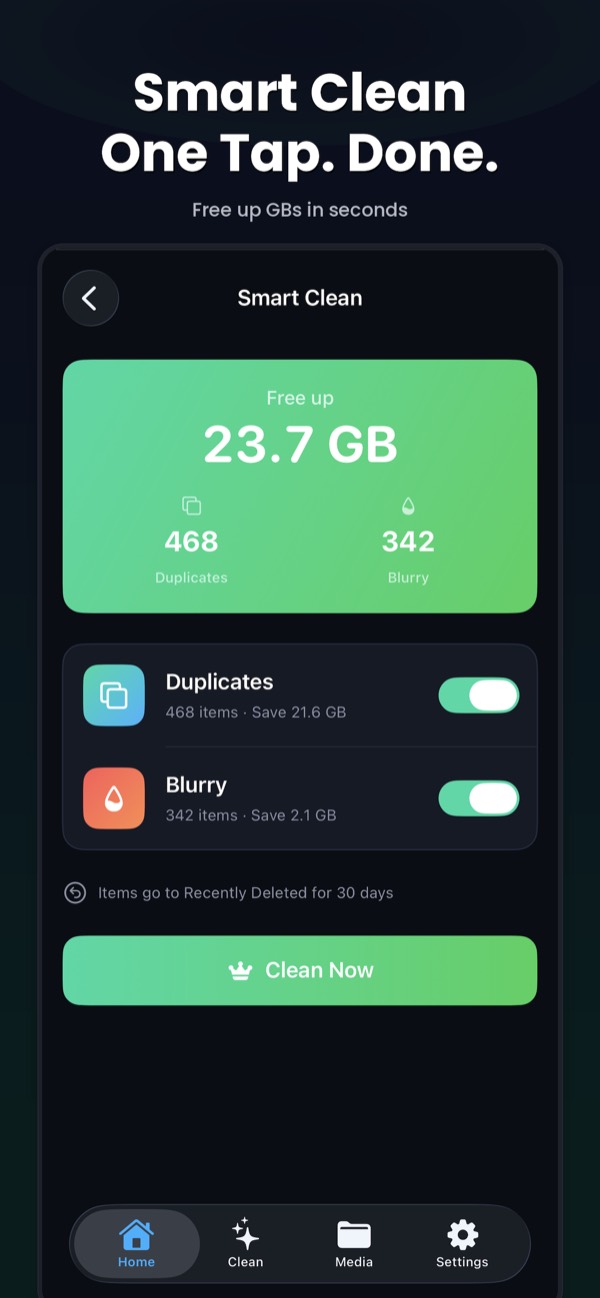
What Smart Clean does
Cleaning an iPhone by hand means visiting the Duplicates album, then the Screenshots album, then scrolling for blurry shots. Smart Clean does that pass for you. It scans your library on your device and puts the safest wins in one place:
- Duplicates: exact and near-duplicate photos, keeping the best shot in each group
- Blurry photos: out-of-focus and shaky shots detected by on-device AI
- Old screenshots: screenshots older than 30 days
At the top you see the total you’ll free, for example “Free up 23.7 GB”, with a count for each category.
How to use it
- Open Clean Kit and tap Smart Clean on the Home screen.
- Check the total and the categories. Switch off anything you want to review by hand.
- Tap Clean Now.
- When you’re sure, empty Recently Deleted in Photos to get the space back right away.
After each cleanup, a report card shows how much storage you recovered, with a before-and-after comparison you can share as an image.
Safe by design
Smart Clean never bypasses iOS. Deletions go through Apple’s Photos framework, so every item lands in Recently Deleted first. If you want more control, open each category in the Clean tab and review the groups yourself.
Step-by-step guides
IPhone storage full? How to free up space fast
See what is using your space, then clear photos, videos, Messages and apps step by step.
How to delete duplicate photos on iPhone
Use the built-in Duplicates album, then catch the similar shots iOS misses.
How to delete all screenshots on iPhone at once
Find the Screenshots album and select hundreds at once with a swipe.
Frequently asked questions
What does Smart Clean delete?
Smart Clean suggests duplicates, blurry photos and screenshots older than 30 days. You can switch each category off before cleaning, and nothing is removed until you tap Clean Now.
Can I undo a Smart Clean?
Yes. Everything Smart Clean removes goes to the Recently Deleted album in Photos, where you can recover it for about 30 days.
Does Smart Clean upload my photos?
No. The scan runs entirely on your iPhone or iPad. No photos, videos or personal data are uploaded to any server.
More Clean Kit features
Duplicate & similar photo finder
Find exact duplicates and near-identical photos on iPhone with on-device AI. Clean Kit keeps the sharpest shot in each group and sorts by space saved.
AI photo categories
Clean Kit sorts your iPhone photos into People, Travel, Food, Pets, Nature and more with on-device AI, so you can clean up your library one topic at a time.
Screenshot cleaner
Clean Kit groups your iPhone screenshots by age, so you can delete everything older than 30 days in one go and keep the recent ones you still need.
Video compressor
Compress large iPhone videos with HEVC at three quality levels and keep your memories in far less space. Clean Kit sorts videos by size and runs on-device.
Live Photo converter
Every Live Photo hides a short video. Clean Kit converts Live Photos to stills in bulk and keeps the original date, location and metadata.
WhatsApp media cleaner
WhatsApp can copy every photo and video you receive into your camera roll. Clean Kit finds that WhatsApp media in your library so you can bulk-delete it.
Storage dashboard & report card
See total, used and free iPhone storage at a glance, with a breakdown of photos, videos, screenshots and Live Photos, plus a report card after every cleanup.
Widgets & Siri Shortcuts
Add Clean Kit storage and battery widgets to your Home Screen or Lock Screen, and ask Siri to check storage, scan for duplicates or start a Smart Clean.