
Screenshot cleaner
Screenshots pile up into the thousands. Clean Kit groups them by age (last 7 days, last 30 days and older) so you can select a whole group and delete it in bulk, instead of dragging across thousands of thumbnails.
Download on the App Store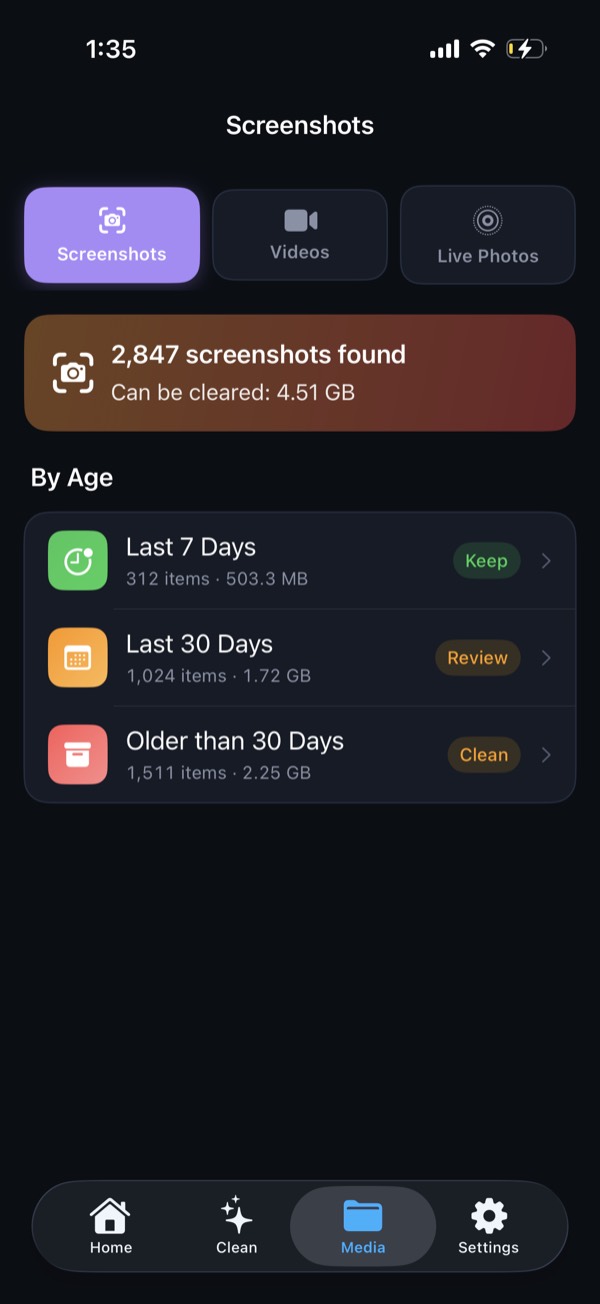
Grouped by age
Recent screenshots are often still useful: a boarding pass, a code, a map. Old ones almost never are. Clean Kit sorts screenshots into three groups:
- Last 7 days
- Last 30 days
- Older
Select the older group and delete it in one go. Smart Clean also includes screenshots older than 30 days automatically.
Why it matters
One screenshot is small, but thousands add up to gigabytes. They also clutter search results and Memories in the Photos app. A quick monthly cleanup keeps both your storage and your library tidy.
Deleted screenshots go to Recently Deleted first, so you can recover anything for about 30 days.
Frequently asked questions
Is there a Select All for screenshots on iPhone?
Not in the Photos app. You have to tap Select and drag across the grid. Clean Kit lets you select a whole age group, such as everything older than 30 days, in one tap.
Will deleting screenshots remove them from iCloud?
Yes, if iCloud Photos is on, because your library syncs across devices. Deleted screenshots stay in Recently Deleted for about 30 days first.
More Clean Kit features
Smart Clean
Clean Kit's Smart Clean bundles duplicates, blurry photos and old screenshots into one recommendation, shows the space you'll free, and cleans in one tap.
Duplicate & similar photo finder
Find exact duplicates and near-identical photos on iPhone with on-device AI. Clean Kit keeps the sharpest shot in each group and sorts by space saved.
AI photo categories
Clean Kit sorts your iPhone photos into People, Travel, Food, Pets, Nature and more with on-device AI, so you can clean up your library one topic at a time.
Video compressor
Compress large iPhone videos with HEVC at three quality levels and keep your memories in far less space. Clean Kit sorts videos by size and runs on-device.
Live Photo converter
Every Live Photo hides a short video. Clean Kit converts Live Photos to stills in bulk and keeps the original date, location and metadata.
WhatsApp media cleaner
WhatsApp can copy every photo and video you receive into your camera roll. Clean Kit finds that WhatsApp media in your library so you can bulk-delete it.
Storage dashboard & report card
See total, used and free iPhone storage at a glance, with a breakdown of photos, videos, screenshots and Live Photos, plus a report card after every cleanup.
Widgets & Siri Shortcuts
Add Clean Kit storage and battery widgets to your Home Screen or Lock Screen, and ask Siri to check storage, scan for duplicates or start a Smart Clean.