
Clean Kit vs CleanMy®Phone
CleanMy®Phone is MacPaw's photo cleaner and the replacement for Gemini Photos. Both apps find duplicates, similar and blurry photos, compress videos and convert Live Photos, all on your device. CleanMy®Phone adds contact merging. Clean Kit adds a screenshot cleaner grouped by age and a WhatsApp media finder, is a much smaller download, and its privacy label is Data Not Collected.
We make Clean Kit, so we're not neutral. Every fact about CleanMy®Phone below comes from its US App Store listing or official website, linked under Sources. How we compare apps.
At a glance
| Clean Kit | CleanMy®Phone | |
|---|---|---|
| Price | Free download; optional Pro (weekly, monthly or yearly) | Free download; CleanMyPhone monthly $7.99, yearly $36.99, or unlimited $34.99; 3-day free trial |
| App Store rating | New app, not enough ratings yet | 4.6 from 23K ratings |
| Privacy label | Data Not Collected | Data used to track you: identifiers, usage data |
| Duplicate & similar photos | Yes | Yes |
| Blurry photos | Yes | Yes |
| AI photo categories | Yes | Yes |
| Video compression | 3 levels: Optimal (HEVC, up to 4K), 1080p, 720p | Yes |
| Live Photos to stills | Yes | Yes |
| WhatsApp media finder | Yes | Not listed in the description |
| Contact merging | No | Yes |
| Download size | 8.3 MB | 176.4 MB |
| Requires | iOS 18.6 or later | iOS 17.0 or later |
Prices, ratings and privacy labels as shown on the US App Store in October 2026. Privacy labels are reported by each developer and not verified by Apple. Check the listing before deciding, as they change.
Two similar apps
CleanMy®Phone and Clean Kit cover much of the same ground: duplicates and similar photos, blurry shots, screenshots, large videos, Live Photos and AI categories. Both say photos are analyzed on your device. So the differences are in the details.
Where CleanMy®Phone is stronger
- Track record. MacPaw has made Mac and iPhone cleaners for years, and CleanMy®Phone carries over Gemini Photos’ users.
- Contacts. It can merge duplicate and similar contacts, which Clean Kit doesn’t do.
- Sensitive photos. You can mark photos as sensitive to keep them out of cleanups.
Where Clean Kit is stronger
- No tracking. Clean Kit’s privacy label is Data Not Collected. CleanMy®Phone’s label lists identifiers and usage data as used to track you.
- Screenshots and WhatsApp. Clean Kit groups screenshots by age for bulk cleanup and finds WhatsApp media saved to your library.
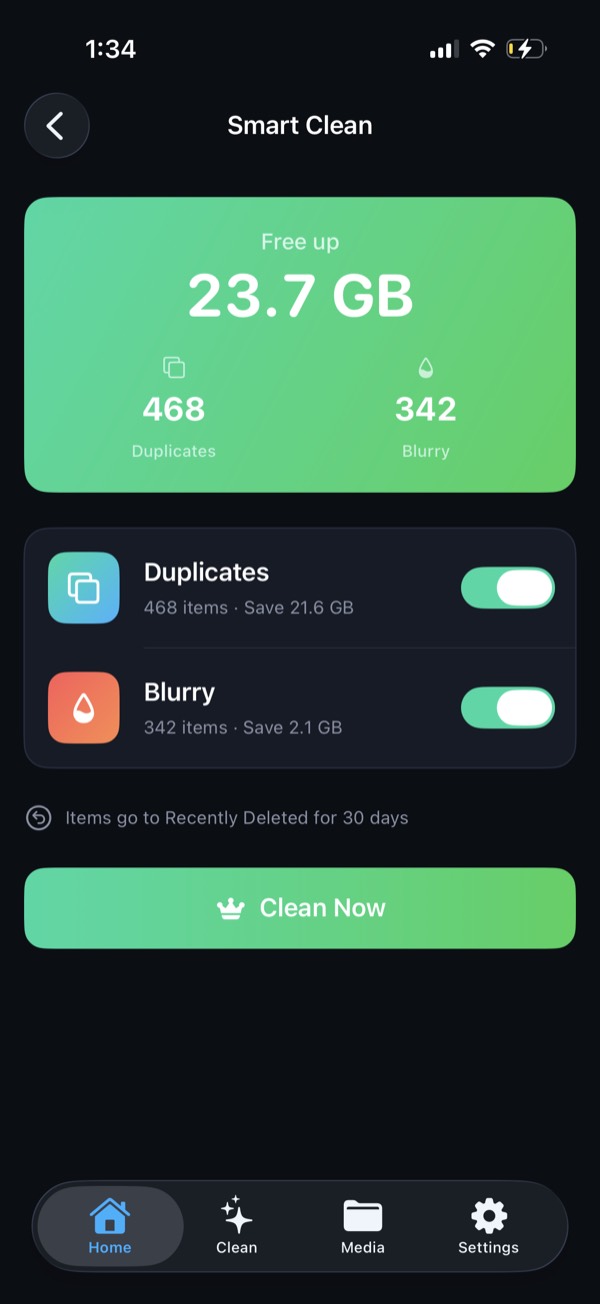
- One-tap Smart Clean with a clear “you’ll free X GB” total before anything is deleted.
- Size. 8.3 MB versus 176.4 MB.
If you’re leaving Gemini Photos
See our roundup of the best Gemini Photos alternatives.
Try Clean Kit free
Scan your library on your device and see exactly how much space you can get back before you delete anything. No account, no tracking, and your photos never leave your iPhone.
Download on the App StoreFree to download for iPhone and iPad. Everything runs on your device, and your photos are never uploaded.
Frequently asked questions
Is CleanMy®Phone the same as Gemini Photos?
MacPaw says Gemini Photos has been entirely replaced by CleanMy®Phone and no longer exists in its original form. Existing Gemini Photos users were moved to CleanMy®Phone automatically.
Do both apps process photos on the device?
Yes, both describe on-device processing of your photos. The difference is in the privacy labels. CleanMy®Phone's lists identifiers and usage data as used to track you, while Clean Kit's is Data Not Collected.
Which is better for duplicate photos?
Both find exact duplicates and similar shots and suggest the best one to keep. Clean Kit ranks each group by sharpness, resolution, exposure and face quality, and sorts groups by how much space they save.