
Best duplicate photo cleaner apps for iPhone (2026)
Start with the free Duplicates album in Photos, which merges copies of the same image. For similar shots and blurry photos you need an app. Clean Kit is our pick for privacy, with on-device AI and a Data Not Collected label. CleanMy®Phone and Clever Cleaner are strong alternatives, and Cleanup suits people who also want contacts and email cleanup.
We make Clean Kit, so we're not neutral. Every competitor fact comes from its US App Store listing in October 2026, linked under Sources. How we compare apps.
Start with the free built-in tool
Open Photos → Utilities → Duplicates and tap Merge. It’s free, private and built in, and it catches true copies. What it can’t do is group similar shots (bursts, retakes) or find blurry photos, and that’s usually where most of the wasted space is. See our step-by-step guide.
The apps at a glance
| App | Price (US) | Privacy label: tracking | Similar photos | Blurry photos |
|---|---|---|---|---|
| Clean Kit | Free; optional Pro | None (Data Not Collected) | Yes | Yes |
| CleanMy®Phone | Free; $7.99/mo or $36.99/yr | Identifiers, usage data | Yes | Yes |
| Clever Cleaner | Free; $39.99 lifetime | Identifiers | Yes | Not listed |
| Cleanup | Free; weekly from $5.95 | Purchases, identifiers, usage data | Yes | Not listed |
| Cleaner Kit | Free; IAPs $4.99–$6.99; ads | Purchases, location, identifiers, usage, diagnostics, other | Yes | Yes |
| Slidebox | Free; from $1.99/week | None listed | Compare while swiping | Not listed |
| Boost Cleaner | Free; from $5.99/week | Purchases, location, identifiers, usage, diagnostics | Yes, incl. bursts | Not listed |
1. Clean Kit: best for privacy
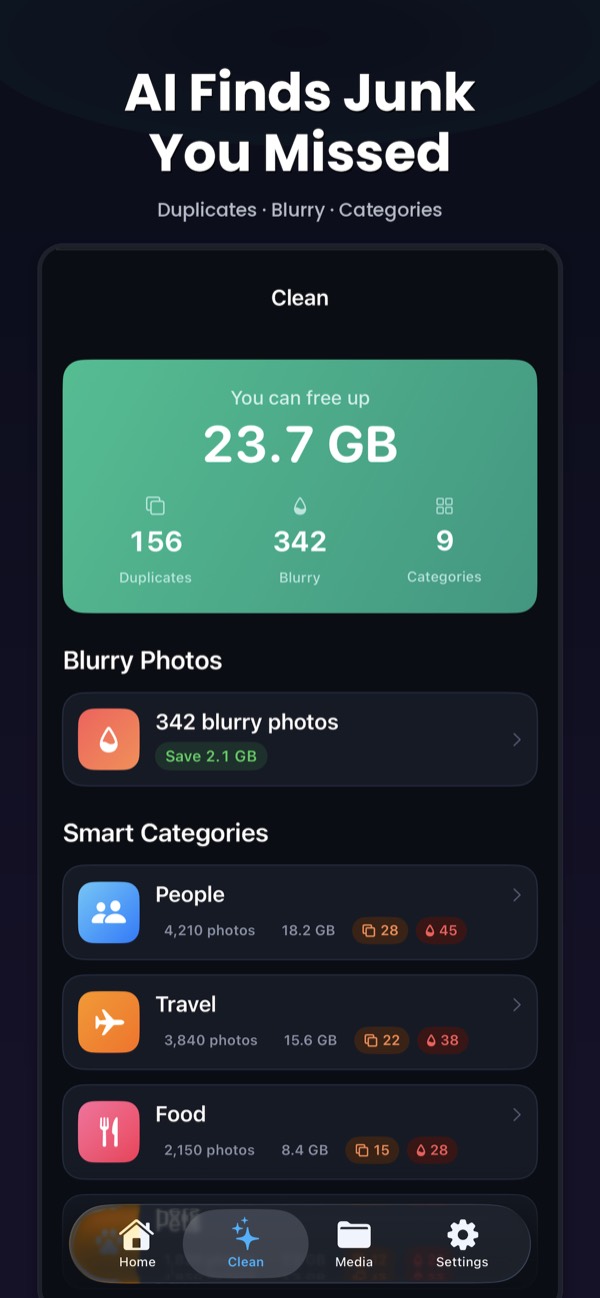
Finds exact duplicates, similar shots and blurry photos with Apple’s on-device Vision framework, and picks the best photo in each group by sharpness, resolution, exposure and face quality. Groups are sorted by space saved, and Smart Clean shows the total before you delete. It also compresses videos and converts Live Photos. Its privacy label is Data Not Collected, and it’s an 8.3 MB download.
Best for: anyone who wants AI duplicate detection without giving up any data.
2. CleanMy®Phone: best known
MacPaw’s replacement for Gemini Photos. It finds duplicates, similar and blurry photos, sorts photos into AI categories and merges contacts. Best for: former Gemini Photos users. Full comparison.
3. Clever Cleaner: best one-time purchase
From CleverFiles, the makers of Disk Drill. Highly rated, with a Best Shot pick, swipe mode, and a $39.99 lifetime option. Best for: people who don’t want a subscription. Full comparison.
4. Cleanup: best all-in-one
The most-rated cleaner on the App Store, also covering contacts and email, with a private vault. Best for: one app for photos, contacts and inbox. Full comparison.
5. Cleaner Kit: broad, with ads
A long-running all-in-one cleaner from BPMobile with swipe sorting, email and contact cleanup and a secret folder. Its listing says it contains ads. Not the same app as Clean Kit. Full comparison.
6. Slidebox: best for manual sorting
A swipe-based organizer rather than an automatic cleaner. You can compare similar shots and sort photos into albums. Best for: curating a library by hand. Full comparison.
7. Boost Cleaner: contacts plus photos
Finds duplicate photos and bursts, and also cleans and backs up contacts. Available in English and Chinese. Full comparison.
How to choose
- Privacy matters most: Clean Kit.
- No subscriptions: Clever Cleaner’s lifetime purchase.
- Contacts and email too: Cleanup.
- You enjoy going through photos by hand: Slidebox.
Try Clean Kit free
Clean Kit finds exact duplicates, similar shots and blurry photos on your iPhone, picks the best photo in each group and sorts groups by how much space they save. No account, no tracking, and your photos never leave your device.
Download on the App StoreFree to download for iPhone and iPad. Everything runs on your device, and your photos are never uploaded.
Frequently asked questions
Does iPhone have a built-in duplicate photo remover?
Yes. Since iOS 16, Photos has a Duplicates album under Utilities that merges copies of the same image. It doesn't find similar shots or blurry photos.
Are duplicate photo apps safe?
Look for on-device processing, deletion through Recently Deleted, and a clear App Store privacy label. These apps need full access to your library, so the privacy label matters.
What is the best free duplicate photo app for iPhone?
The built-in Duplicates album is completely free. Most cleaner apps, including Clean Kit, are free to download with optional paid plans for full features.
Sources
- Clean Kit – Storage Cleaner on the App Store
- CleanMy®Phone on the App Store
- Clever Cleaner: AI CleanUp App on the App Store
- Cleanup: Phone Storage Cleaner on the App Store
- Cleaner Kit – Clean Up Storage on the App Store
- Slidebox: Photo Cleaner App on the App Store
- Boost Cleaner – Clean Up Smart on the App Store