The best iPhone storage cleaner app in 2026
The built-in Photos app only merges exact duplicates. It can't find similar shots or blurry photos, can't compress videos, and makes bulk cleanup slow. Clean Kit does all of that in one app, and every scan runs on your iPhone, so your photos are never uploaded. And you see exactly how much space you'll get back before deleting anything.
Written by the Clean Kit team. Yes, we make the app. Here's an honest look at what it does that iOS doesn't.
Clean Kit vs the built-in Photos app
| What you want to do | iPhone Photos app | Clean Kit |
|---|---|---|
| Find exact duplicates | ✓ Yes | ✓ Yes |
| Find similar shots and bursts | ✗ No | ✓ Grouped automatically, best shot picked for you |
| Find blurry photos | ✗ No | ✓ On-device AI |
| See how much space you'll free first | ✗ No | ✓ Before you delete anything |
| Clear old screenshots in bulk | Drag to select, one by one | ✓ Grouped by age, one tap |
| Compress videos | ✗ Trim only | ✓ 3 quality levels, up to 4K HEVC |
| Convert Live Photos to stills | One at a time | ✓ In bulk, metadata kept |
| Find WhatsApp media in your library | ✗ No | ✓ Yes |
| Storage widgets and Siri Shortcuts | ✗ No | ✓ Yes |
| Photos stay on your device | ✓ Yes | ✓ Yes, 100% on-device |
Why Clean Kit
1. It finds the space iOS misses
Exact duplicates are only a small part of a cluttered library. The real waste is the five near-identical shots of every moment, the blurry attempts, the bursts and the long 4K videos. Clean Kit uses Apple's on-device Vision framework to find all of them and ranks every group by sharpness, resolution, exposure and face quality, so the best photo is always kept.
2. Your photos never leave your iPhone
A cleaner app needs full access to your photo library, so privacy matters. Clean Kit does every scan and every AI check on your device. No photos, videos or personal data are uploaded to any server. Read our privacy policy.
3. It's safe by design
Nothing is deleted without your review. Everything you clean goes to Recently Deleted, where you can recover it for up to 30 days.
4. One tap when you're in a hurry
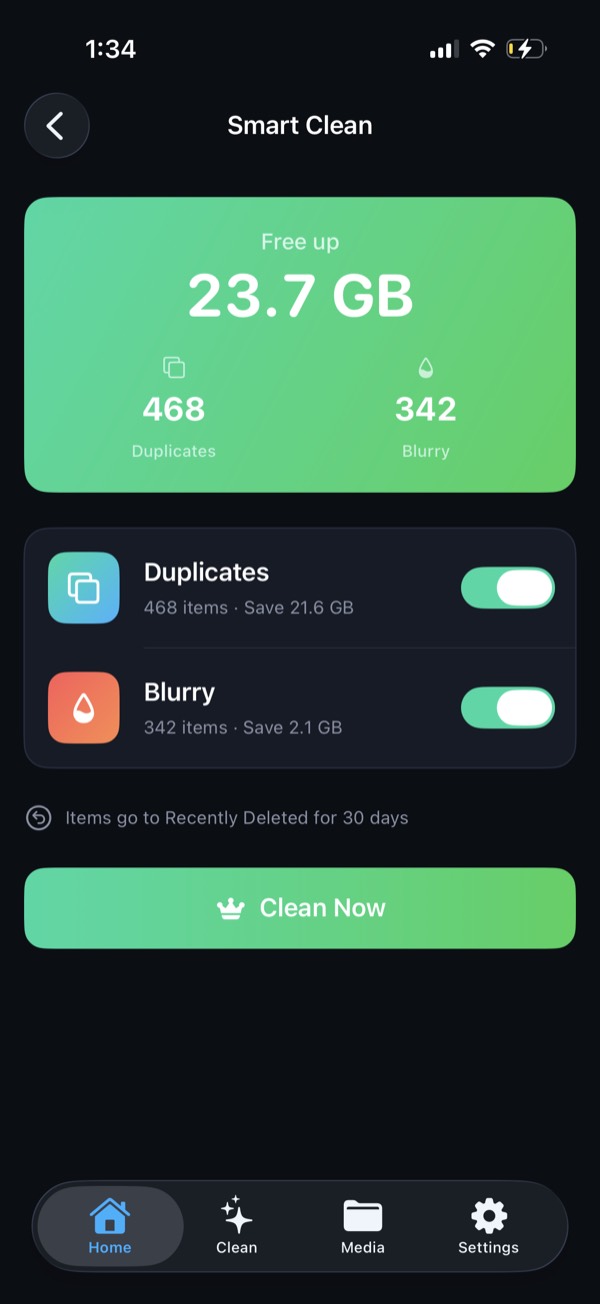
Smart Clean bundles duplicates, blurry photos and screenshots older than 30 days into one recommendation with a clear "you'll free X GB" total. Toggle categories on or off, then tap Clean Now. After each cleanup, a report card shows how much you recovered.
5. More than photos
Compress large videos instead of deleting them, convert Live Photos to stills in bulk, clean WhatsApp media saved to your library, and keep an eye on free space with Home Screen and Lock Screen widgets. Works on iPhone and iPad.
How to free up space with Clean Kit
- Download Clean Kit from the App Store and allow photo library access. The scan needs full access to compare photos.
- Scan. Clean Kit analyzes your library on your iPhone in seconds to minutes, depending on its size.
- Review Smart Clean suggestions, or go through duplicates, blurry photos, screenshots, videos and Live Photos one category at a time.
- Clean. Tap Clean Now, then empty Recently Deleted when you're sure to free the space right away.
What to look for in any iPhone cleaner app
- On-device processing. Your photo library shouldn't be uploaded to be analyzed.
- A clear App Store privacy label. Scroll to "App Privacy" on the app's App Store page.
- Safe deletion through Recently Deleted.
- No fake "speed boost" or "RAM cleaner" claims. iOS manages memory itself.
Clean Kit was built to tick every one of these boxes.
Try Clean Kit free
Scan your library in seconds and see exactly how much space you can get back before you delete anything. Smart Clean bundles duplicates, blurry photos and old screenshots into one tap, and everything goes to Recently Deleted first, so nothing is lost by accident.
Download on the App StoreFree to download for iPhone and iPad. Everything runs on your device, and your photos are never uploaded.
Frequently asked questions
What is the best app to clean iPhone storage?
For photos and videos, which take up most space on most iPhones, you want an app that finds similar and blurry photos, compresses videos and works on-device. Clean Kit does all of this and never uploads your photos.
Is Clean Kit free?
Clean Kit is free to download from the App Store. Some features require a subscription, which you can manage or cancel any time in Settings → [your name] → Subscriptions.
Is Clean Kit safe to use?
Yes. All scanning happens on your iPhone and no photos or personal data are uploaded. Deleted items go to Recently Deleted, so you can recover anything for up to 30 days.
Do iPhone cleaner apps speed up my phone?
They free storage, which helps when your iPhone is nearly full, because iOS slows down when it has no room for caches and updates. Be wary of apps that claim to "clean RAM": iOS manages memory itself.
Does Clean Kit work on iPad?
Yes. Clean Kit is a universal app with layouts designed for both iPhone and iPad.