How to convert Live Photos to still photos on iPhone
Select one or more Live Photos in the Photos app, tap the ⋯ (More) button and choose Duplicate, then Duplicate as Still Photo. Then delete the original Live Photos and empty Recently Deleted. Just turning "Live" off in Edit doesn't save any space, because the video is still stored.
Why Live Photos take up extra space
A Live Photo is really two files: a still image and a short video clip of about 1.5 seconds before and after you press the shutter. That hidden clip means a Live Photo is often around twice the size of a regular photo. Across thousands of shots, that's gigabytes of video you may never play.
Method 1: Duplicate as a still photo (built in)
- Open Photos → Media Types → Live Photos to see only your Live Photos.
- Tap Select and choose the photos you want to convert.
- Tap the ⋯ button and choose Duplicate.
- When asked, tap Duplicate as Still Photo. iOS creates a regular photo copy of each one.
- Go back, select the original Live Photos and delete them.
- Empty Utilities → Recently Deleted to actually free the space.
Watch out: Duplicates can show up next to the originals in your library, which makes the originals harder to pick out in step 5. Work in small batches, for example one month at a time.
Why turning "Live" off in Edit doesn't help
If you open a Live Photo, tap Edit and tap the LIVE button to turn it off, the photo displays as a still. But edits in Photos are non-destructive. The video stays stored so you can turn Live back on later. That's useful, but it frees zero storage.
Method 2: Stop taking Live Photos by default
- Open the Camera app and tap the Live Photos icon (concentric circles) so it shows a line through it.
- Go to Settings → Camera → Preserve Settings and turn on Live Photo. Without this, the Camera turns Live Photos back on the next time you open it.
You can still turn Live on for moments where motion matters, like pets, kids or fireworks.
Convert Live Photos in bulk
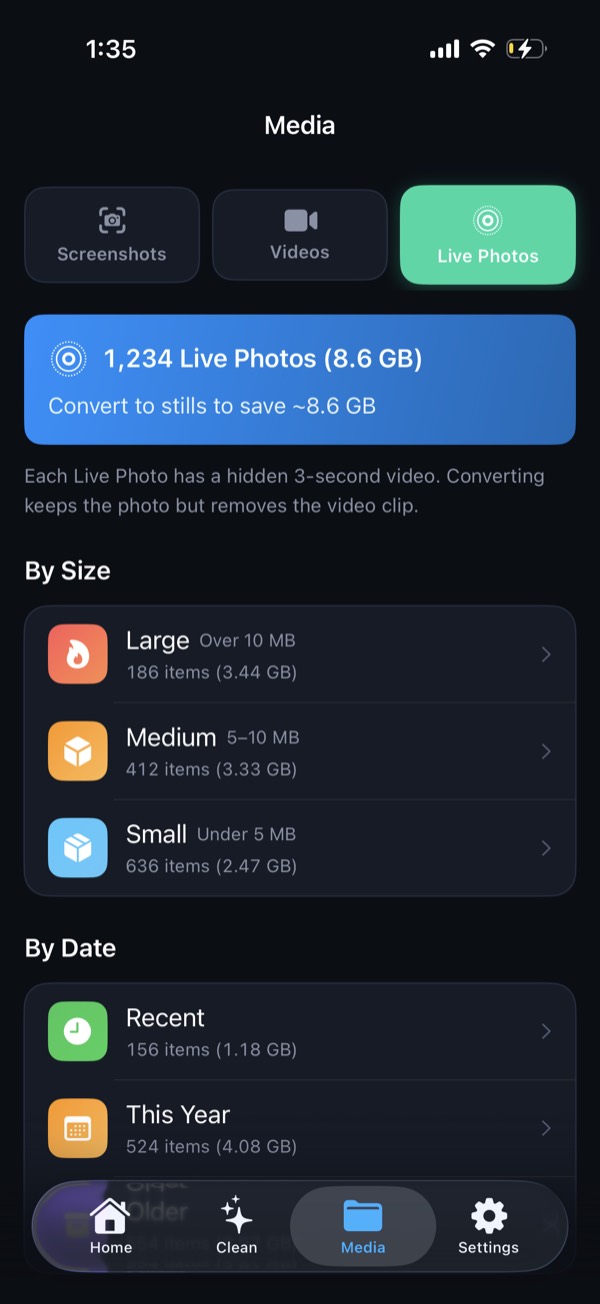
Clean Kit finds all your Live Photos, sorts them by size and date, and converts them to stills in bulk. The original creation date, location and metadata are preserved, so your photos stay in the right place in your timeline. No duplicating and deleting one by one.
Download on the App StoreFree to download for iPhone and iPad. Everything runs on your device, and your photos are never uploaded.
Frequently asked questions
How much space does a Live Photo take?
It varies by camera and scene, but a Live Photo is often roughly twice the size of the same shot as a still, because it includes a short HEVC video clip next to the image.
Will I lose the date and location when converting a Live Photo?
Duplicating as a still in Photos generally keeps the original date and location. Clean Kit also preserves creation date, location and other metadata when converting, so converted photos stay in the same place in your library.
Can I turn a still photo back into a Live Photo?
No. Once the video part is deleted it can't be recovered, unless the original is still in Recently Deleted. Keep Live Photos of moments where the motion matters to you.